Skip to content

Multi-tenant SaaS starter for SvelteKit 3

Skip the tenant plumbing. Build your product.

Organizations with roles and invitations. Per-seat Stripe plans with limits the API enforces. Background jobs that put AI to work on documents. One-VPS hosting with a restore drill for your backups. The part a stack generator leaves to you.

Sales are not open yet.

Or start with the free edition on GitHub
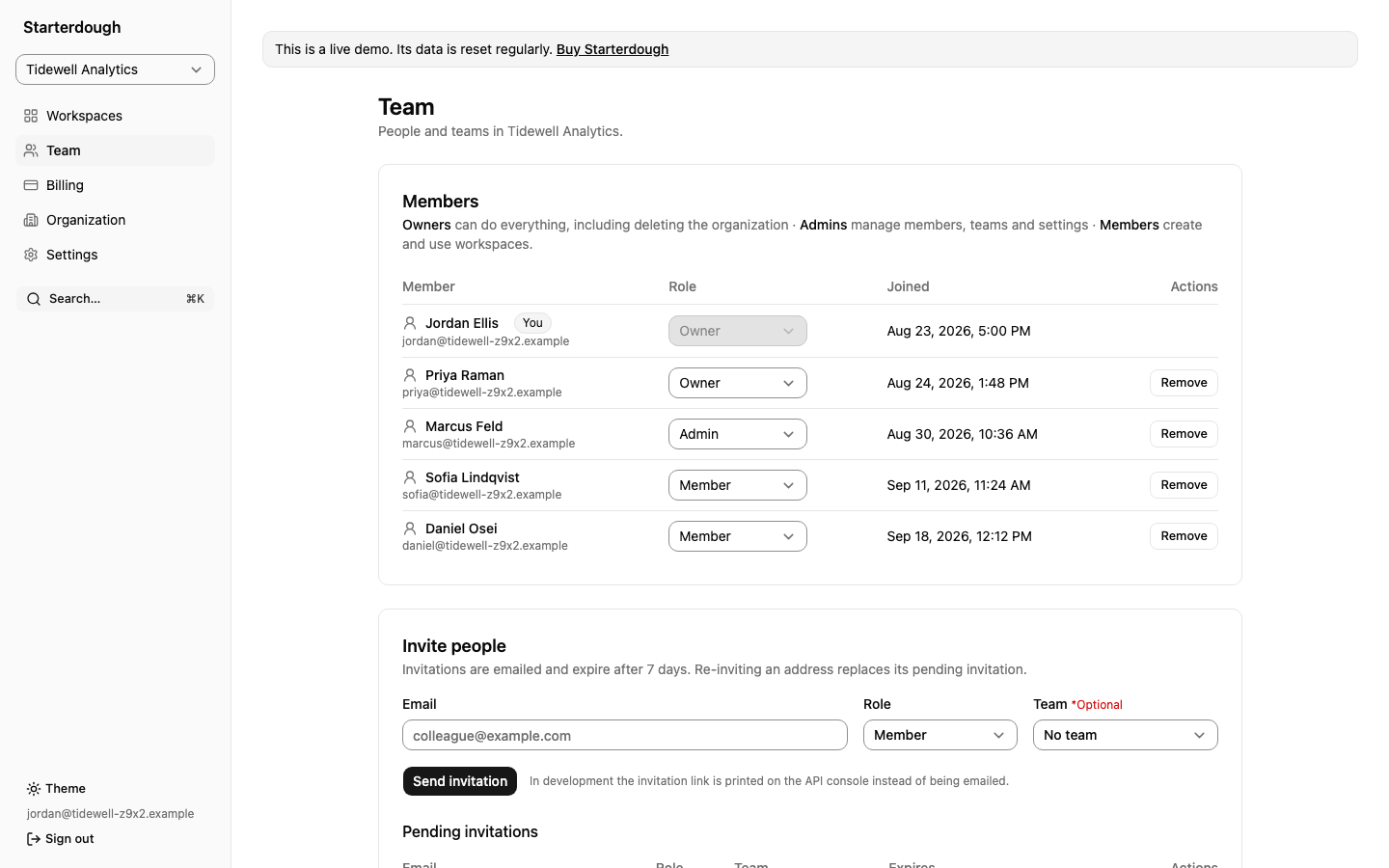
The Team page of the sample organization Tidewell Analytics: five members with owner, admin and member roles and the dates they joined, above a form that invites people by email with a role and an optional team.
Live demo, sample data: an organization with members in owner, admin and member roles, and the form that sends invitations.

Built on

  • SvelteKit 3
  • Svelte 5
  • Bun
  • TypeScript
  • Hono + oRPC
  • Postgres
  • Better Auth
  • Stripe
  • Docker
Meet the stack

What's included

Start where stack generators stop.

Stack generators wire up the stack: framework, database, API, sign-in and, at most, a payment provider. That still leaves you to build multi-tenancy yourself. Starterdough ships the stack with that layer already built: the organization as the tenant, per-seat billing with limits the API enforces, and the operations a B2B SaaS needs before its first customer.

Full edition

Organizations with roles and invitations

The organization is the tenant. Owner, admin and member are defined in one file, and the API checks them on every call. Write a tenant procedure that skips the check, and a test fails.

  • Email invitations that expire after seven days
  • Workspaces, and teams as access boundaries around them
  • An audit log per organization, with filters and a CSV export
  • Organization API keys with scopes, and signed webhooks
Full edition

Per-seat Stripe billing with real limits

Stripe subscriptions belong to the organization, not the individual user. On per-seat plans the seat count follows the member count. The API refuses work past the plan.

  • Free, Pro and Team plans, with a trial, in one catalog file
  • Limits on workspaces, members, AI credits and storage
  • Plan features the API enforces and the app can upsell
  • Customer portal, cancel and restore, a grace period for failed payments
Full edition

Background jobs and AI document processing

Presigned uploads to local disk, S3 or R2. A Postgres queue and a worker run the jobs that extract text, OCR images, summarize and index documents for search.

  • A Python/FastAPI service that only the API can reach
  • pgvector semantic search within a workspace
  • Credits charged per job, refunded when a job fails
  • Job kinds, schedules and stored files of your own
Free + Full

One VPS, with backups and a restore drill

Docker Compose and Caddy run the whole stack on one server. A provisioning script prepares a fresh Ubuntu or Debian box. The deploy and backup workflows have not yet run against a real server: the kit's tests exercise them with stand-in SSH and Docker commands, and back up and restore a real Postgres.

  • Nightly pg_dump and uploads, copied to S3 or R2
  • A deploy workflow built to back up the database before it migrates
  • A restore drill that restores into a scratch database and checks row counts
  • Integration tests for backup and restore
  • GitHub Actions workflows for server status, logs and backups, with no shell
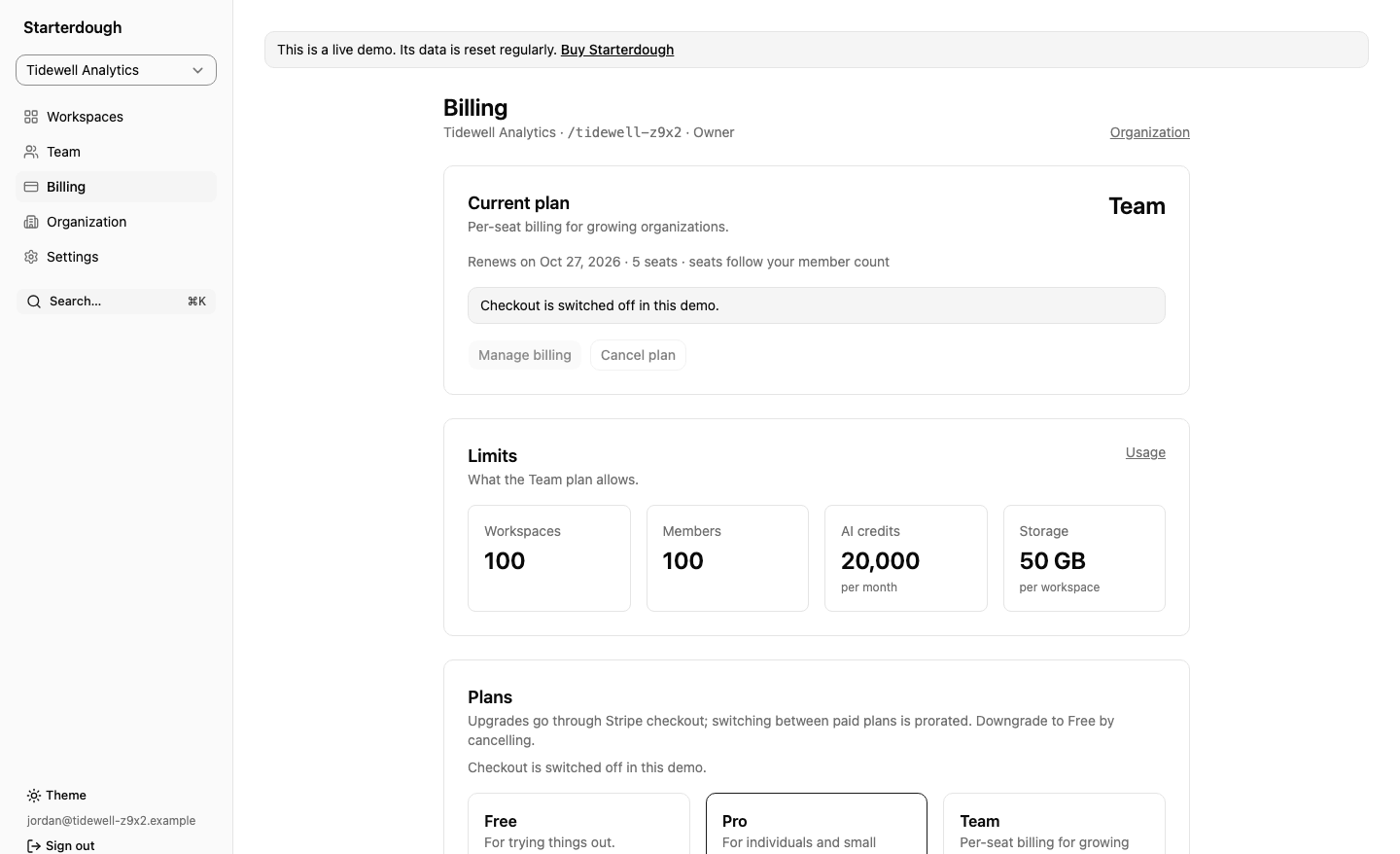
The Billing page of the same organization on the Team plan: it renews on 27 October 2026 with 5 seats that follow the member count, a notice that checkout is switched off in the demo, and the plan limits of 100 workspaces, 100 members, 20,000 AI credits a month and 50 GB of storage per workspace.
Live demo, sample data: a per-seat Team plan whose seat count follows the members, and the limits it sets. Checkout is switched off in the demo.
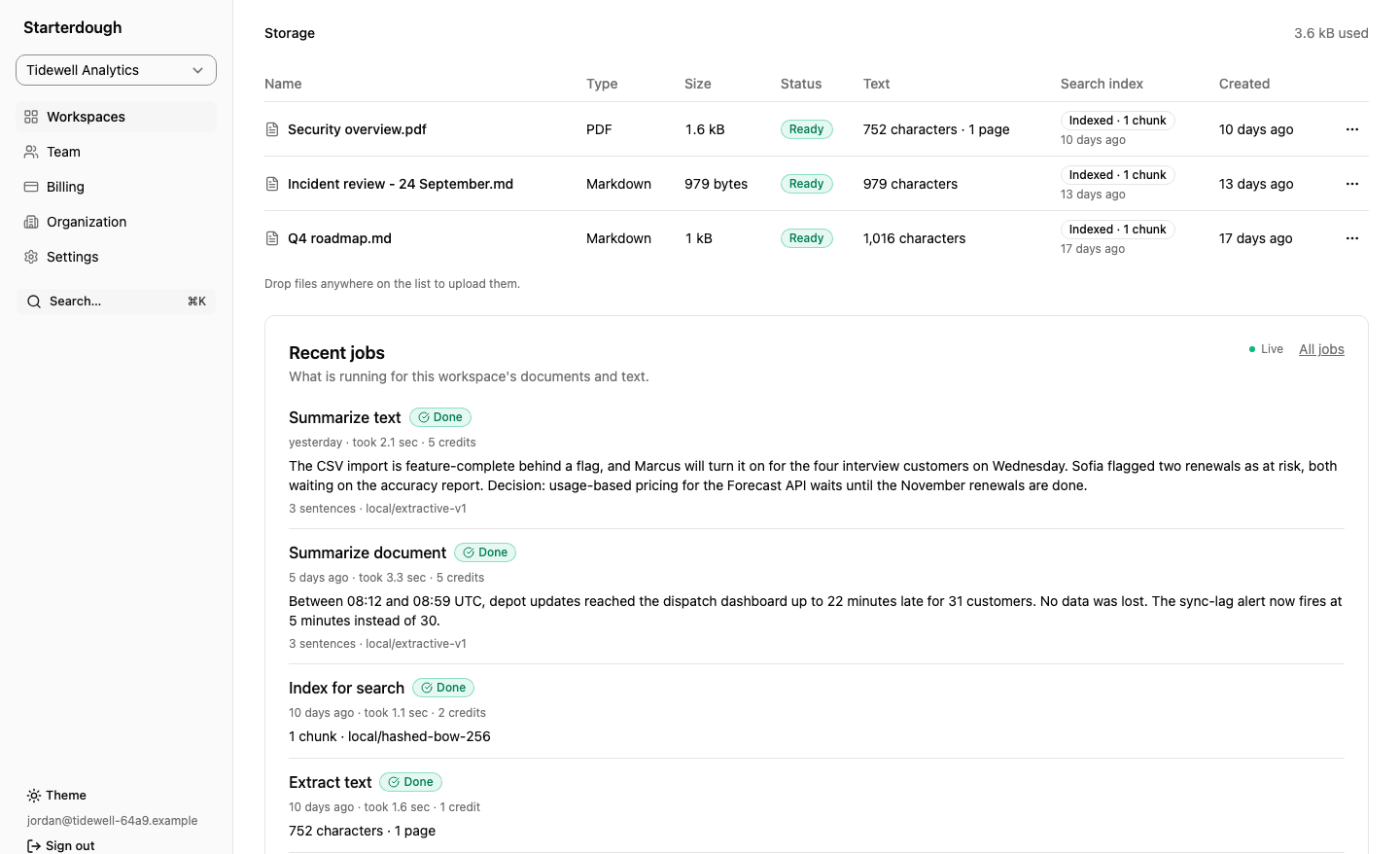
A workspace's documents: three ready files, a PDF and two Markdown documents, each indexed for search, above a list of recent jobs (Summarize text, Summarize document, Index for search and Extract text), each marked done with its duration and the AI credits it was charged.
Live demo, sample data: documents indexed for search, and a sample job history with the credits each job was charged. The summaries are sample text written for the demo, where AI jobs are switched off.

What you clone starterdough-turbo

Private repository
  • apps/web The SvelteKit 3 app, in English and German. Full edition adds organization, billing and workspace screens.
  • apps/api Hono + oRPC API. Full edition adds the job queue and its worker, API keys and webhooks.
  • packages/api-contract The typed contract: RPC, REST, OpenAPI.
  • packages/auth Better Auth: sessions, 2FA, passkeys, admin. Full edition adds organizations, roles, seats.
  • packages/billing Plans, per-seat Stripe prices, limits. Full only
  • packages/storage Presigned uploads: local disk, S3, R2. Full only
  • packages/db Drizzle schema and Postgres. Kit and product migrations keep separate histories.
  • services/ai FastAPI: extract, OCR, summarize, embed. Full only
  • infra Compose, Caddy, VPS setup, backups.
  • apps/site, apps/docs Astro marketing site, Starlight docs.
  • apps/native Tauri 2 desktop shell, mobile setup.
The free edition is generated from this same tree, without the organization layer and everything built on it.

Inside the source

Boring glue code, already written.

Clear boundaries between the interface, the API contract, Postgres and your infrastructure. Your product tables and migrations keep a history apart from the kit's, so a kit release that adds a migration does not conflict with yours.

Free + FullFull edition

Everything in Free is included in Full.

Free + Full

Interface & developer experience

Svelte 5 and SvelteKit 3, wired for forms and i18n.

Svelte 5 and SvelteKit 3 build the interface and routes. Tailwind 4 styles it; TypeScript connects it. Bun and Turborepo run the workspace.

  • Bun
  • Svelte 5
  • SvelteKit 3
  • TypeScript
  • Tailwind 4
  • Turborepo
Components, forms and languages
Make the interface yours
Edit shadcn-svelte and Bits UI component source, style with Tailwind 4, and use Lucide icons.
Keep forms and data in step
Superforms and Zod validate inputs; TanStack Query handles fetching and mutations.
Start with two languages
Paraglide includes English and German, with a language switcher in Settings. Account emails arrive in the language the app shows.
Free + Full

Authentication & account security

Sessions, passkeys, 2FA and an admin surface.

Better Auth handles sign-in and account changes, with passkeys, TOTP and revocable sessions. Google and GitHub sign-in and production email use credentials you provide.

  • Better Auth
  • Email + password
  • Google
  • GitHub
  • Passkeys
  • Two-factor
  • Resend

Google and GitHub require OAuth credentials. Production email uses your Resend account.

Account and security flows
Everyday account changes
Email verification, password reset, change email and account deletion sit alongside sessions users can revoke.
More ways to protect access
WebAuthn passkeys and authenticator-app TOTP with backup codes are included.
A protected admin area
Role-protected screens cover users, feature flags and system administration. Admins can ban and unban accounts, or sign in as a user to help them.
Free + Full

API & database

One typed contract for RPC, REST and OpenAPI.

Hono serves HTTP on Bun. oRPC and Zod define one contract. TypeScript clients use its types, and REST and OpenAPI come from the same procedures. Only the API reaches Postgres, through Drizzle.

  • Hono
  • oRPC
  • Postgres
  • Drizzle
  • Zod
  • REST + OpenAPI
Contract, routes and data
One contract, checked at runtime
oRPC procedures and Zod schemas define requests and responses; clients use their types without generated client code.
More than one way in
The same procedures expose RPC and REST under /api/v1, with generated OpenAPI for integrations and an interactive reference in the docs app.
Data behind the API
Only the API accesses Postgres through Drizzle. Schema, migrations and permission checks stay in the repository and API, and your migrations keep a history apart from the kit's.
Full edition

Teams, payments & product operations

Tenants, teams, per-seat billing and webhooks.

Full adds workspaces, teams, invitations, audit logs, API keys, signed webhooks, Stripe subscriptions, files and queued jobs. Connect your Stripe account, and a bucket if you use cloud storage.

  • Stripe
  • Teams + roles
  • S3 / R2 / local
  • Background jobs
  • Audit log
  • API keys
  • Webhooks

Connect your Stripe account and prices. Cloud storage needs your bucket and provider configuration.

Teams, payments and operations
Workspaces with clear roles
Organizations include owner, admin and member roles, teams that act as access boundaries, emailed invitations, and an audit log with filters and a CSV export.
Integrations for your customers' systems
Organization API keys carry scoped permissions. Outbound webhooks are signed and retried for about 21 hours, and private addresses are refused.
Billing tied to access
Trials, seats, a customer portal, cancellation and restoration. Stripe uses your account and prices; the API enforces plan limits and plan features.
Files and work that continues
Workspace quotas cover local or S3-compatible documents and the files a workspace stores; a Postgres queue and worker run your own job kinds and schedules and report live progress.
Full edition

AI, search & document processing

A FastAPI service for extraction, OCR, summaries and embeddings.

Full includes a Python/FastAPI service that extracts text, runs OCR on images, summarizes documents and computes embeddings. The API stores them in pgvector for search. Background jobs show progress; credits track use.

  • FastAPI
  • Python + uv
  • pgvector
  • OCR
  • AI credits

Local summaries and embeddings are for development. Configure a model provider for production summaries and search; OCR and text extraction can run locally.

Documents, providers and credits
From upload to search
Extract text, run OCR locally, summarize and index documents for pgvector semantic search.
Choose the model provider
OpenAI or compatible providers supply model output; deterministic summaries and embeddings are for development and testing.
See the work and usage
Background jobs show progress and results; a metered credit ledger and API plan limits track usage.
Free + Full

Platforms, publishing & ownership

Self-host on one VPS, with web, PWA and native starting points.

Build for web, add PWA support, wrap the static build with Tauri 2, or initialize mobile targets. Docker Compose and Caddy handle self-hosting, TLS and backups.

  • Web
  • PWA
  • Tauri 2
  • iOS / Android setup
  • Docker
  • Caddy
  • Astro
  • Starlight
Platforms, hosting and launch sites
Web with limited offline support
Node, Cloudflare or static builds include a PWA manifest, service worker and offline fallback; authenticated pages and data stay online.
Desktop and mobile starting points
Tauri 2 wraps the static build, and setup scripts initialize Android and iOS targets.
Your server and your backups
Docker Compose and Caddy run the stack with backup and restore scripts and a deploy workflow built to take a database backup first. Server status, logs and backups run from GitHub Actions, with no shell. The Bun API needs a running server.
Places to tell your story
Separate Astro marketing and Starlight docs apps are included in the repository. They publish your product's notes and docs, not the kit's.
WebPWA supportDesktop shellMobile setup
ONE CONTRACTTyped HTTP APIHono + oRPC
PostgresServices

Connect your provider accounts during setup. Hosting, email, payments and storage have their own usage costs.

Compare every feature by edition
AuthenticationFree + Full
Email and password with verification, password reset, change email and account deletion. GitHub and Google sign-in switch on when their credentials are set, and a private deployment can close sign-up.
Two-factor and passkeysFree + Full
TOTP with backup codes, WebAuthn passkeys, and a session list users can revoke from.
Getting-started checklistFree + Full
The app's home page lists what a new account still needs: verify the email address, add a passkey or two-factor. A step ticks itself once it is true, and the list goes away when all are done. The full edition adds creating a workspace and inviting a teammate.
Admin surfaceFree + Full
Users, feature flags and a system page, behind a role the API enforces. Admins ban and unban accounts, revoke sessions, and can sign in as a user for an hour to help them.
One typed APIFree + Full
Hono and oRPC over Postgres and Drizzle. One contract is the source of truth for the RPC client, plain REST under /api/v1 and an OpenAPI 3.1 document, which the docs app renders as an interactive reference. TypeScript clients use its types without generated client code.
Product files and migrationsFree + Full
Your tables, contract, procedures, raw HTTP routes, emails, environment variables, messages, sidebar links, commands and settings sections go in product files the kit never changes, and your dependencies in packages of their own. Your migrations keep a history of their own, so a kit release that adds a migration no longer conflicts with yours. Your product keeps its own version number too.
InternationalizationFree + Full
English and German, compiled per message. Users switch language in Settings, and verification, password-reset, email-change and account-deletion emails arrive in the language the app shows.
PWA and offlineFree + Full
Installable, with a service worker and an offline fallback page.
Desktop shell and mobile setupFree + Full
Tauri 2 desktop shell and Android/iOS setup scripts around the same static build. A shell can ask which server to use, so one installer serves every deployment. Not finished yet. Inside the shells only email-and-password sign-in works: no GitHub or Google sign-in, no passkeys, and an account with two-factor turned on cannot sign in there yet. Stripe Checkout and the billing portal open in the system browser. The session token sits in webview storage rather than an OS keychain, and there is no auto-update. The desktop shell has been run by hand on Windows only, and installed builds are unverified. Mobile targets have never been initialized (that needs Android Studio or Xcode); signing and store publishing are your setup.
Marketing site and docsFree + Full
An Astro landing site and a Starlight documentation site, both static. They publish your product's release notes and docs, not the kit's; the kit's manual builds only when you ask for it.
Self-hostingFree + Full
Docker Compose for the whole stack, Caddy for TLS and subdomains, and backup and restore scripts with a restore drill. The deploy workflow is built to take a database backup before it migrates, check the server's SSH host key and clock, and smoke-test the result, and other GitHub Actions workflows to show server status and logs and run backups without a shell. The deploy and backup workflows have not yet run against a real server: the kit's tests exercise them with stand-in SSH and Docker commands, and back up and restore a real Postgres. Set a Sentry DSN and the web app's server and the API report their errors. Without Docker, one command serves the whole app from one machine, behind one origin you can publish to your own devices over Tailscale.
Organizations, teams, workspacesFull edition
The organization is the tenant. Workspaces hold the product data, and every query is scoped by a foreign key. Teams are access boundaries: a workspace scoped to a team reaches only its members and the organization's owners and admins. One middleware checks membership, role and team before every tenant procedure, and a test fails for a procedure that skips it.
Roles and invitationsFull edition
Owner, admin and member, plus roles of your own, defined in one file and enforced in the API. Invitations are emailed, in the inviter's language, as links that expire. Members delete only what they uploaded; owners and admins delete anyone's.
Audit logFull edition
Who did what, per organization, readable by owners and admins on a page of its own, with action and date filters and a CSV export. Platform admins see every organization's. An action taken by an admin signed in as a user records the admin too, and one taken with an API key names the key.
Organization API keysFull edition
Owners and admins create keys with scoped permissions (never more than their own role holds), an optional expiry and last-used tracking, and can revoke them. A key is shown once, stored only as a SHA-256 hash and rate-limited. The OpenAPI document says which operations accept one.
Outbound webhooksFull edition
HTTPS endpoints per organization for member, workspace, document, job and subscription events, and events of your own. Deliveries are signed the Standard Webhooks way and retried on the job queue, eight attempts over about 21 hours, with a delivery log, redelivery and secret rotation. Private, loopback and link-local addresses are refused, and redirects are never followed.
BillingFull edition
Stripe subscriptions per organization, per seat, with plan limits and plan features enforced server-side and a customer portal. Flat-priced plans can also bill yearly.
Documents and storageFull edition
Presigned uploads to S3, R2 or local disk, a storage quota per workspace, and a document model scoped to a workspace. Stored files hold your product's own uploads and exports, such as attachments, avatars and logos, scoped to a workspace, organization or user and deleted with the row that owns them.
Background jobsFull edition
A Postgres-backed queue and a job worker, scoped to the organization. Your product declares its own job kinds, with input checked before a job runs, and schedules that run once per tick across every worker. Jobs take priorities, a dedupe key, a time budget and progress, and a lease lets the sweep take back only a dead worker's jobs. The worker runs inside the API by default or as its own process.
AI serviceFull edition
FastAPI service managed with uv for text extraction, OCR, summaries and embeddings. The API stores the embeddings for pgvector semantic search and meters a credit ledger.
Start free. The multi-tenant layer is not on sale yet.

The free edition is a real single-tenant foundation. A licence adds the private repository with organizations, per-seat billing, background jobs and the AI service. Hosting and third-party services have their own costs.

Free edition

Public repository

$0

A real single-tenant foundation.

  • Authentication, admin, the typed API, PWA support and self-hosting
  • Single-tenant: no organizations, API keys, webhooks, billing, documents, jobs or AI
  • Public repository, no trial, no licence key
Start with the free edition

Team

Full edition

$299one-time

Same licence, more GitHub accounts, and a call.

  • Everything in Solo
  • Up to 5 GitHub accounts invited to the private repository
  • 12 months of updates; keep every version you received
  • A 45-minute onboarding call with the maintainer
Email to hear when sales open

One payment per licence. No subscription, no per-project fee, no revenue share. 12 months of updates from the day you buy. Keep and use every version you received, forever.

All sales are final. Refunds are at our discretion, and where the law requires them. Sales are not open yet. Read the licence before you buy. Not sure yet? Try the live demo and the free edition first.

After payment, updates and support

01

Keep the Polar order email

Polar records the purchase and emails a link to its Customer Portal, where you can find the order, receipt and benefits attached to it.

02

Use the GitHub account that should receive access

The GitHub Repository Access benefit issues a collaborator invitation to the private repository. Complete the GitHub account step shown with the benefit, then accept the invitation in GitHub. A Team licence invites up to 5 GitHub accounts to the private repository.

03

Clone it into your own private workspace

The licence covers any number of your employees and contractors working on your products. Keep the kit private, remove access when a Developer stops working for you, and do not share it with another legal entity or a client that has not bought a licence.

Updates: 12 months of updates from the day you buy. Keep and use every version you received, forever.

If the repository invitation is missing, expired or tied to the wrong GitHub account, email hello@starterdough.dev with your Polar order ID, purchase email and intended GitHub username. Never send a password, access token or payment-card details.

Who builds this

Subash Chandra

Founder and sole maintainer of Starterdough.

Common questions, straight answers.

What exactly am I buying?

Collaborator access to the private GitHub repository holding the full edition, and a licence to build products on it. You clone it and rename it to your product with one command. There is no runtime of ours, no hosted service and nothing that phones home.

Can I try it before I buy?

Yes. The live demo runs the full edition web app with fictional data and resets every day. Uploads, document search, AI jobs, API keys, webhooks, checkout and outgoing email are switched off there. The free edition is generated from the same source without the organization layer, so you can also run its auth, admin, typed API and self-hosting yourself.

Can I sell what I build with it?

Yes. Build and sell unlimited products, commercial or not, for yourself or for clients, closed-source, with no attribution and no revenue share. What you cannot do is pass on the kit itself: republish it, resell it as a starter or template, or hand the source to a client who has not bought their own licence.

How many developers does it cover?

Any number, as long as they work for you. The licence is per individual or legal entity, not per developer, and cannot be shared across separate legal entities, including a parent or a subsidiary. What differs between Solo and Team is how many GitHub accounts we invite to our private repository to pull updates (1 or up to 5), and Team adds a 45-minute onboarding call. Everyone else works from your own private copy.

Do I get updates?

Yes, for 12 months from the day you buy. Updates arrive as commits in the private repository, and UPGRADING.md explains how to merge them without losing your changes. Your own code goes in product files and a migration history of its own, which no kit release touches. What you put there does not conflict with an upgrade. When the 12 months are up, you keep every version you received and can keep using it in every product, forever.

Is this a subscription?

No. You pay once per licence: Solo is $99 until 31 March 2027, then $149, and Team is $299. Nothing renews and there is no second invoice.

Is the free edition limited?

It is a smaller product, not a demo: real authentication, real admin, the typed API and real self-hosting, with no time limit and no licence key. It is generated from the same source with the multi-tenancy layer and everything that depends on it removed.

How finished are the desktop and mobile shells?

They are starting points, not finished shells. The repository includes a Tauri 2 desktop shell and Android/iOS setup scripts that wrap the same static build of the web app and talk to the same API. Inside the shells only email-and-password sign-in works: no GitHub or Google sign-in, no passkeys, and an account with two-factor turned on cannot sign in there yet. Stripe Checkout and the billing portal open in the system browser. The session token sits in webview storage rather than an OS keychain, and there is no auto-update. The desktop shell has been run by hand on Windows only, and installed builds are unverified. Mobile targets have never been initialized (that needs Android Studio or Xcode); signing and store publishing are your setup.

What does it run on?

One Postgres database and one container host. The whole stack self-hosts on a single small VPS with Docker Compose. The marketing site, docs and web app also build to static assets for a CDN.

What is not included?

Anything specific to your product, and any third-party account it talks to: Stripe, an S3-compatible bucket, a Resend account, an AI model provider and OAuth apps. The integration code is written; opening and paying for those accounts is on you.